
| Creator | El Gato |
|---|---|
| Category | Flying Machines |
| Size | 63 × 13 × 91 blocks |
| Blocks | 1,172 |
| Minecraft | 1.21.X |
| Create | 6.0.10 |
| Mods | Simulated, Create, Aeronautics, Createdieselgenerators |
| Downloads | 1,833 |
| Added | 2026-07-26 |
Schematic by El Gato, published on CreateMod.com. This page lists what it contains; download the file from the creator’s page.
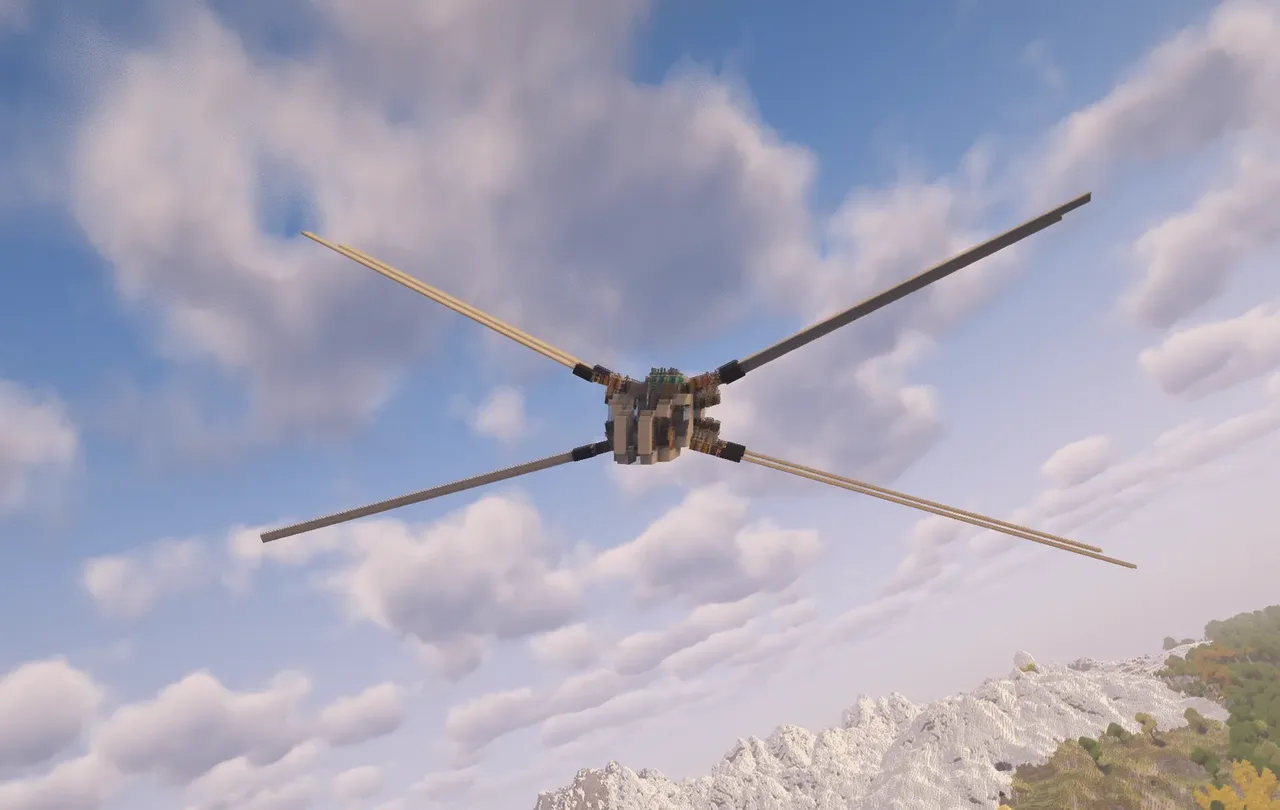
Welcome to the Shai Hulud Prototype V2, a Work-In-Progress improvement of the previous Shai Hulud Prototype.
Now using a set of Modular Diesel Generators, V2 is now easier to start up and more powerful than ever, with a massive SU headroom available to potential expansions to its performance.
The most important change in V2 is the added shoulder joint mobility. After a complete overhaul of its powertrain, we were able to pack a much more complex powertrain into a volume barely larger than the V1 prototype. This new powertrain allows individualised vertical rotation of V2's 4 wing pairs (split among left-right, top-bottom).
Additionally, the added power, equal distribution of sails, and more liberal use of end stone/levitite has made V2 an incredibly smoothly flying vehicle.
Note, the V2 is still WIP. The large number of levitite and end stones was based on experience gathered in the development of V1. They are actually not necessary for V2's max flight height, and their placement makes the schematic more difficult to simply print & use in survival.
For V3, eliminating the use of levitite and possibly end stone will be considered to maximise the survival accessibility of the craft.
=== Usage Instructions ===
To build the Shai Hulud Prototype V1, first print the schematic without applying any rotation or mirroring. Then verify the following:
The entire craft body (up to the propeller bearings on either side) is encased in Honey Glue.
The wings are all individually encased in Slime Glue
The Powertrain Quadrants are all individually glued.
Please apply the glues if they failed to print for you. Specifically, the powertrain quadrants have complex glue segments to avoid the engine itself. I may include a video instruction in the future. In the mean time, it is recommended to print the schematic in a creative world if you wish to study the glue zones, and reach out via the comments if you need further instructions.
Once verified, attach a contraption assembler to the cockpit area and assemble the vehicle.
After the assembly, you may want to verify the following but it is not strictly necessary:
The swivel bearings assemble correctly and are all set to "Always Locked"
The propeller bearings assemble correctly
The speed controller inside the cockpit (next to the mechanical belt) is set to 256 RPM clockwise
Additionally, please apply Turbo Chargers to all of the Modular Diesel Engines.
Engine Fueling and Start Up
At the bottom rear of the vehicle, you can find a docking connector with a hand crank and lever. You may use the lever to activate the docking connector and link to to any valid liquid fuel source (Diesel is preferred to avoid system overstress at max power). Turn the hand crank to start up the in-let pump engine. Once the engine begins running, it will self-fuel and stop automatically after the docking port is disconnected.
To start up the main engine, turn the hand crank inside the cockpit in the rear port side. Once the handle begins turning rapidly, it means the fuel pump is running and the engine will now self-fuel. There is no engine off-switch in this version of the prototype.
Extremely important
Before testing the flight controls, you MUST ensure the powertrain quadrants are separated by assembling the main swivel bearings at the top and bottom of the vehicle. They are also accessible from the cockpit via the crawl spaces on either sides of the engine. If you failed to do so, some belts inside the crawl space WILL break, and you will need to replace them.
Controls
Using the Linked Typewriter, the Shai Hulud Prototype V2 can be controlled using the following scheme:
WASD for Forward, Reverse, and Yaw
QE for Roll
RF for Pitch
Left Shift for Lower Wing Pivot (rotates them down)
Space for Upper Wing Pivot (rotates them up)
P for parking mode, tucks wings in and disables thrust
Up/Down Arrows for wing throttle control
The V2 prototype is extremely passively stable, and will generally quickly return to a stable hover if left alone. The poor Yaw stability issue of V1 has now been resolved.
Additional Remarks
Much like V1, V2 is still a proof-of-concept prototype. While it flies extremely well, there are still some areas for improvement, and it needs an actual finalised chassis rather than the current placeholder design.
While in it has flown very well in testing, working with swivel bearings is always not without risk. There are chances of extreme clang where the swivel joints severely glitch out and needs to be manually reset. Always fly with equipment for recovering the Shai Hulud if you plan to use it in survival.
![[1.21.1] (Update) Jumbo Green Airplane v3](/a/52/5276c90d55b6b82.webp) [1.21.1] (Update) Jumbo Green Airplane v3824 blocks · Koba
[1.21.1] (Update) Jumbo Green Airplane v3824 blocks · Koba survival airship3,138 blocks · Kumajpn
 Small aeronautics helicopter94 blocks · Grain
 Helicarier13,734 blocks · Larsx648
 «Стальной Рассвет»6,131 blocks · Dramodal
 Supermarine Spitfire271 blocks · Saurolab
![Autonomous airship taxi V1.5 [Create Aeronautics]](/a/54/5406a46cc8f9764.webp) Autonomous airship taxi V1.5 [Create Aeronautics]4,743 blocks · Dfined
Autonomous airship taxi V1.5 [Create Aeronautics]4,743 blocks · Dfined F35 Lightning II Blockheed Martin431 blocks · Skulk Works
 HELICOPTER MK-1293 blocks · Kiroiko
 North American P-51 Mustang272 blocks · Saurolab
 Airship6,463 blocks · Kik_fik
 Junkers Ju 87 Stuka288 blocks · Saurolab