
| Creator | Aquacrafter1324 |
|---|---|
| Category | Vehicles & Contraptions |
| Size | 38 × 26 × 38 blocks |
| Blocks | 1,927 |
| Minecraft | 1.21.X |
| Create | 6.0.10 |
| Mods | Create, Bits n bobs, Createcasing, Simulated, Copycats |
| Downloads | 120 |
| Added | 2026-08-05 |
Schematic by Aquacrafter1324, published on CreateMod.com. This page lists what it contains; download the file from the creator’s page.
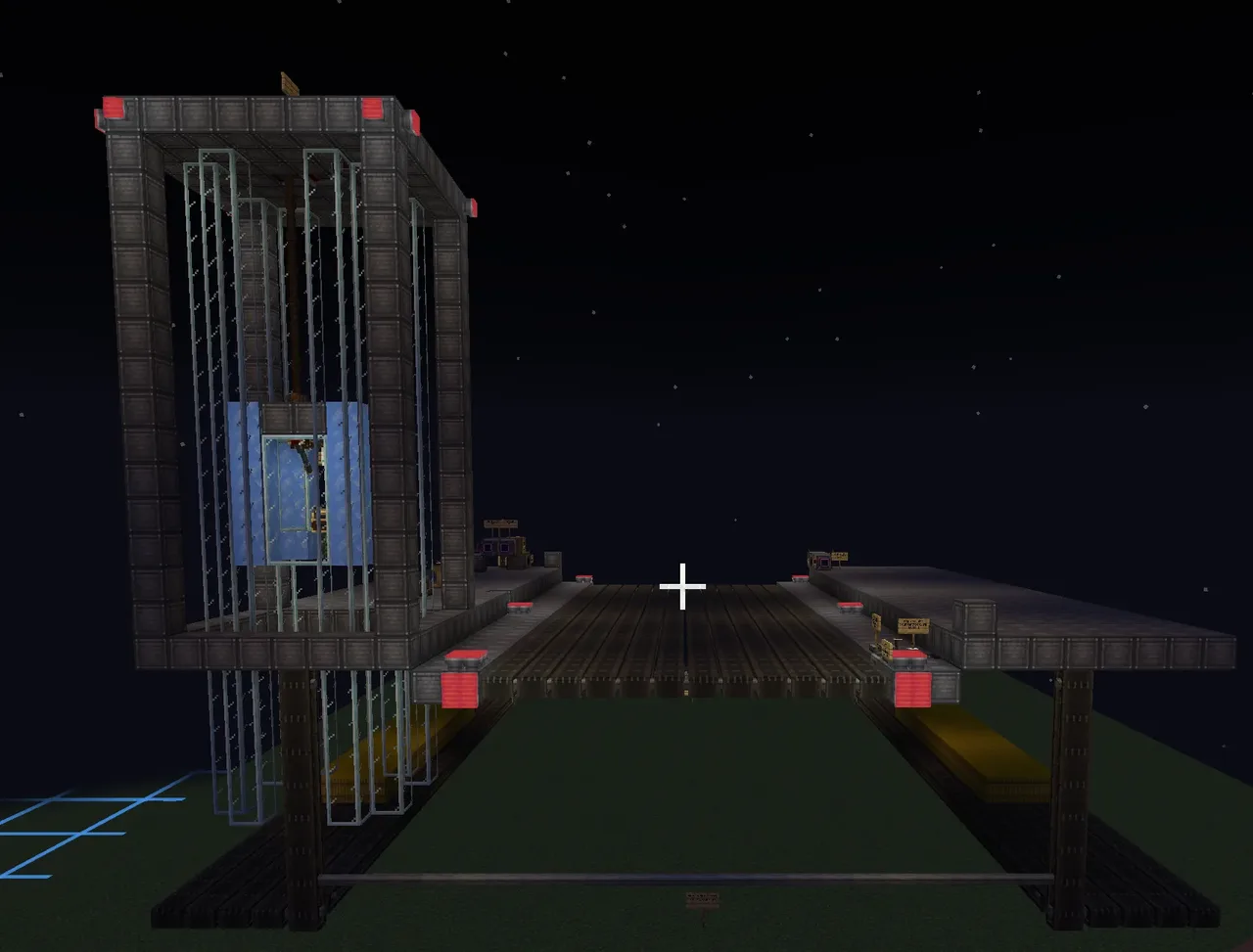
🚀 Welcome to the Aqua Space Administration (ASA) Mobile Launch Infrastructure!
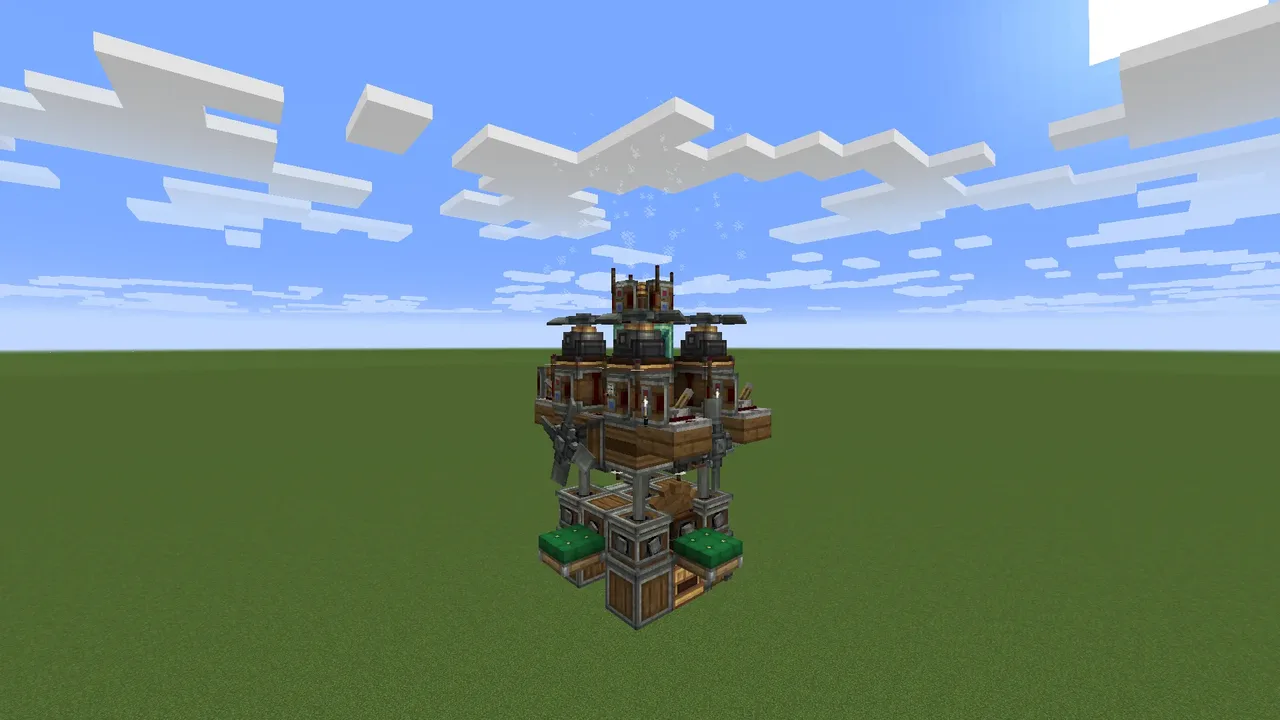
This is the official structural blueprint for the 56-Block-Wide Automated Rocket Carrier, engineered completely for the Create: Aeronautics physics engine.
This heavy-duty crawler is a multi-assembler physics entity designed to safely transport massive, multi-stage spacecraft from your assembly hangar straight onto the launch pad. It features a fully responsive operator’s cabin elevator, independent cargo platform conveyors, a variable hydraulic lift section, and a custom dual-speed transmission gearbox!
This Spacecraft Carrier travels as 0.40 Blocks Per Second (BPS) in Spacecraft Mode, and 7.99 BPS in Normal mode. Regular walking is 4.32 BPS, while sprinting is 5.61 BPS
================================================
🛠️ INSTALLATION & MOD SYSTEM CHECKLIST
================================================
Built on Minecraft 1.21.1 NeoForge. All files are available natively via CurseForge.
REQUIRED MODS:
• Minecraft (1.21.1)
• Create Mod
• Create: Aeronautics
• Create Encased (Required for structural stabilization blocks and casing logic)
OPTIONAL MOD:
• Create: Bits 'n' Bobs (Used for industrial detailing and lights. If you do not use this mod, simply swap out the Chain Pulleys on the chassis for standard Create Rope Pulleys!)
🚨 SETUP INSTRUCTIONS:
1. Place the schematic template into your world folder.
2. 🛑 CRITICAL FIRST STEP: Before assembling anything, make sure to reattach the operator's cab physically to the elevator tower track! If you do not lock it into place first, the cab will immediately drop and fall when you activate the assemblers!
3. Initialize and lock PHYSICS ASSEMBLER 1 FIRST to build out the primary chassis frame.
4. Initialize and lock PHYSICS ASSEMBLER 2 SECOND to bind the multi-section moving platform grid.
5. WARNING: This blueprint saves with active Creative Motors ON for testing purposes! Make sure to swap all input energy blocks to your survival kinetic networks as indicated by the internal bay signs.
6. For exact RPM specifications, please check the configuration notes inside the schematic itself.
7. If input vectors or keybinds desync upon assembly, reference Page 2 of the troubleshooting manual.
📦 VANILLA PHYSICS TRICK:
• Hay Bales [OPTIONAL BALLAST]: The Hay Bales placed in this build are completely optional, and have been added to make the contraption heavyer. as the mod states that Hay Bales are 4 KPG, placing them where they are may help when transporting big spacecraft.
📖 IN-GAME GUIDE: A physical Book and Quill is resting on a Lectern right inside the carrier! Open it up to view the complete setup breakdown and step-by-step gameplay instructions directly in your world.
================================================
🎛️ VEHICLE PILOT FLIGHT CONTROLS
================================================
Mount a seat inside the operator cab and use these exact keybinds to control the vehicle:
• [W] / [S] ➔ Drive Main Chassis Forward / Backward
• [Space] ➔ Raise Operator Cab (Elevator Rails)
• [Left Shift] ➔ Lower Operator Cab (Gravity Drop Rails)
• [Left Arrow] ➔ Rotate Center Platform Conveyors toward [W] Track
• [Right Arrow] ➔ Rotate Center Platform Conveyors toward [S] Track
• [Up Arrow] ➔ Raise Hydraulic Lift Matrix (Elevates Middle Section)
• [Down Arrow] ➔ Lower Hydraulic Lift Matrix (Descends Middle Section)
• [Backspace / Delete] ➔ TOGGLE MOTOR TRANSMISSION MODE:
➔ [Spacecraft Carrier Mode]: Heavy Precision Grid Alignment
➔ [Normal Mode]: High-Speed Empty Fleet Transit
Warning! please make sure that the two vertical belts do NOT move below the block the carrier is moving, or it will get stuck
Developed by Aquacrafter1324. Feel free to use this blueprint in your space agency worlds!
 Curtiss SB2C-5 Helldiver250 blocks · Hyperwolf771
 aurora airshup7,586 blocks · Ghostman
 SS Jabroni (WASD controlled airship)2,537 blocks · Space_core1234
 Speedster95 blocks · Mocraft9937_61806
 rainboweye_end3,415 blocks · Ydash
 Air ship133 blocks · Danilo123456
 The Provoker1,674 blocks · Dwtch
 Spaceship v31,983 blocks · Afkar
 Simple VTOL aircraft v1619 blocks · Supereg7
 Back Propelled Thruster Plane3,378 blocks · Fullmetaljuggernaut
 simple walker251 blocks · Rush2693
 mooha73 blocks · Venera