
| Creator | Edgeworthmuzzry |
|---|---|
| Category | Tanks & Military |
| Size | 9 × 10 × 18 blocks |
| Blocks | 459 |
| Minecraft | 1.21.X |
| Create | 6.0.10 |
| Mods | Create, Copycats, Tracks, Simulated, Createbigcannons |
| Downloads | 275 |
| Added | 2026-10-05 |
Schematic by Edgeworthmuzzry, published on CreateMod.com. This page lists what it contains; download the file from the creator’s page.
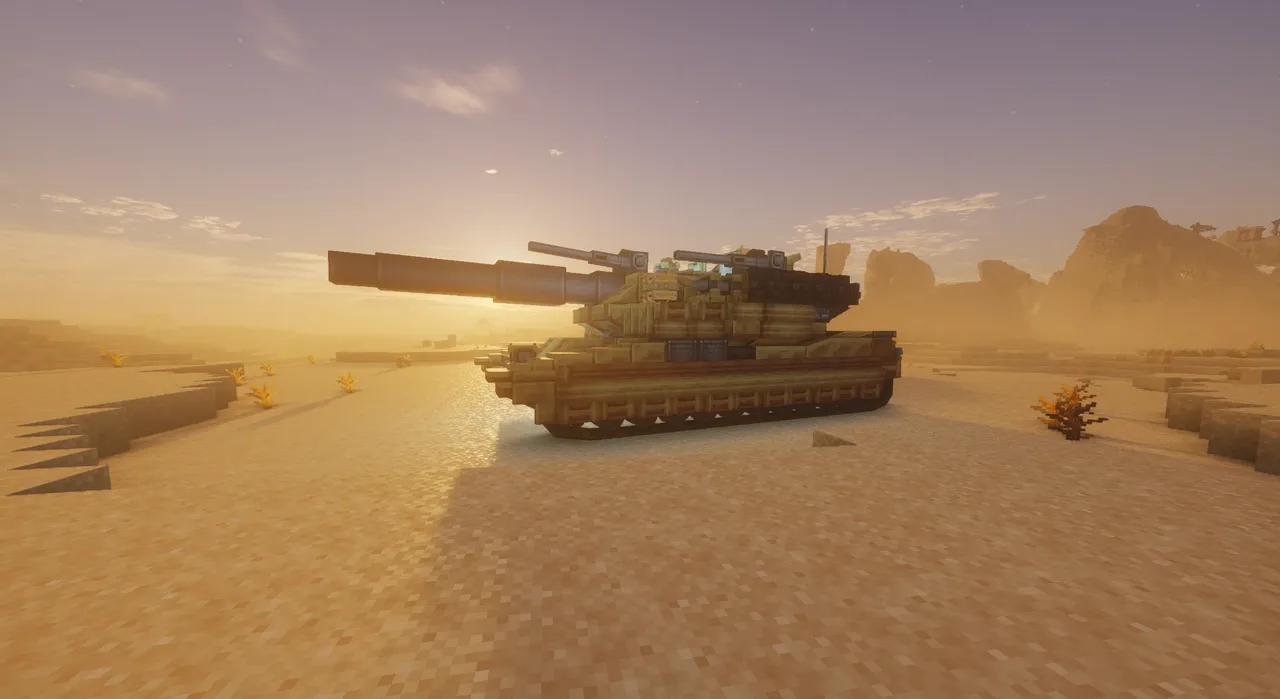
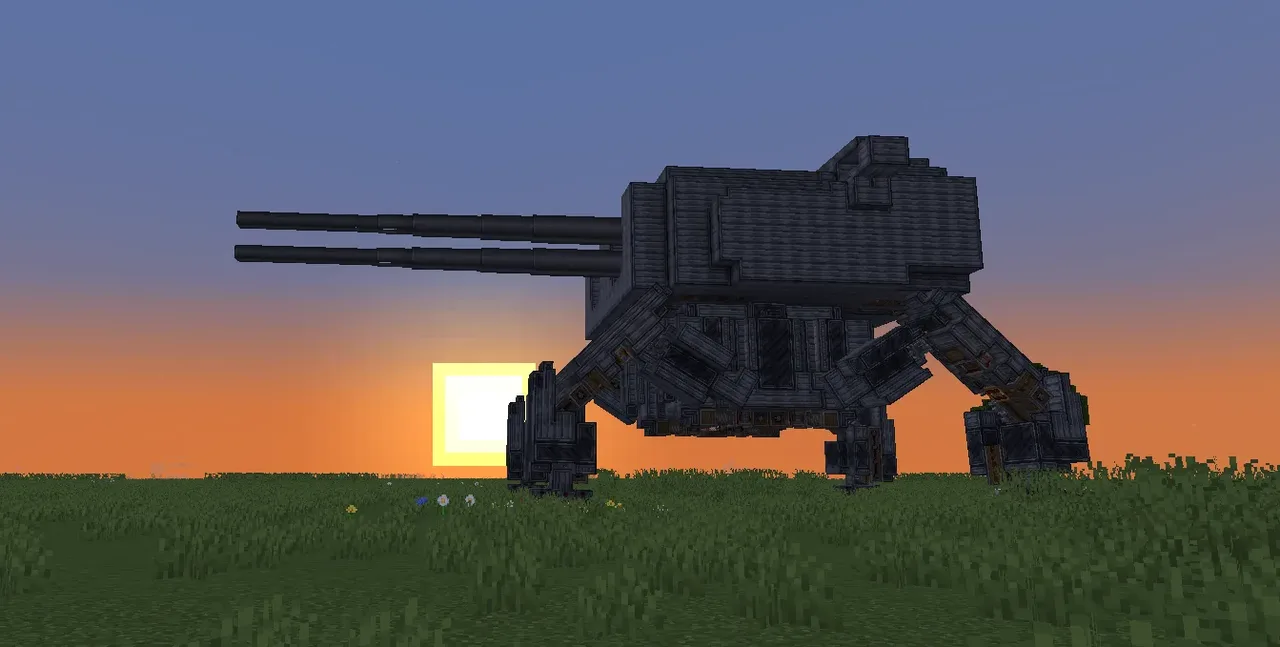
This is a modern-style tank, based on the US M1 Abrams Main Battle Tank. It was suggested by contributor Schematics by Ripersniper4 - CreateMod.com
Compared to my previous tank builds, this one achieves a major technical breakthrough: after assembly is complete, you no longer need to reconfigure the mechanical arm.
Download & Deployment
The Copycats+ mod is required. The copycat blocks provided by Create: Connected cannot fully replace them.
If you have the Photomancy mod, you can download the add-on file slz.nbt-assembled version, drop it into the sable-schematics folder, and directly load the fully assembled physicalized version.
If you downloaded the standard schematic, please strictly follow the instructions on the signs in the blueprint (bilingual in my native language and English) and assemble them in order (5 steps total). If you've played my other works, you're probably familiar with this process by now—you have become an excellent tank mechanic.
The vanilla schematic cannot correctly save the track wheels and suspension states, so you can customize the track style to your liking.
Startup & Entry
Fuel Loading: At the left rear corner of the hull, there is a barrel. That's where you input fuel (coal is fine). Remember to first throw a piece of coal into the engine on the tank's ass to activate auto-loading.
Entering the Tank: Go to the front of the tank, and you'll see an iron handle. Grab it with your mighty arm strength to pull yourself up. Then, right-click the seat blocks to slowly scoot yourself into the driver's cabin—when you feel stuck, press Shift. You'll likely pop right into where you want to go. Moving between compartments inside the tank is mainly done by right-clicking the seat as well.
About Weapons
The tank is equipped with a main cannon, a coaxial machine gun, a remote-controlled top machine gun, and a manually controlled top machine gun.
Main Cannon: Inside the turret compartment, there are signs at the rear indicating two hoppers. They load cartridges and shells respectively. After loading them, the mechanical arm will begin auto-loading the main cannon—but if it doesn't work, first, don't suspect that it's because you haven't paid its wages. What you need to do is check if the cannon is loaded, or use a lever to toggle the mechanical arm to reset its working state.
Coaxial Machine Gun: Use the hopper at the front right of the turret—which is on the base of the coaxial machine gun—and stuff machine gun or autocannon ammunition inside to load it.
Two Top Machine Guns: Load them using magazines.
About Driving
I've posted driving manuals in the lower driver's cabin and on the inner walls of the turret—but if you don't like reading paper documents, I'll add the operating instructions here as well.
Just like my previous tank builds—and unlike the common WSAD driving style—this tank uses an independent track movement system, similar to the dual-stick operation of ancient tanks:
Q/A: Left track forward/backward
E/D: Right track forward/backward
Q+E: Full speed forward
A+D: Full speed reverse
Q+D: Turn right in place
E+A: Turn left in place
↑↓←→: Turret aiming
Space: Main cannon fire
Left/Right Shift: Coaxial machine gun fire
C/Num0: Top machine gun fire
There is a typewriter in both the driver's cabin and the turret. The keybinds are the same, and both can control driving and the turret.
The difference is: when driving from the cabin, the third-person camera follows the hull's rotation; when driving from the turret, the camera follows the turret's rotation.
This tank can probably only be driven in third-person—because the electronic and optical sights used by the real M1 tank can't be replicated with limited mods.
Finally
You might ask why this tank is so flat and the cabin so narrow. Is this a tank issued to enlisted pizzas? — Well, the real M1 Abrams is indeed super flat. The official explanation is to reduce the hit area, and the real M1 driver practically drives lying down—it's just that in Minecraft, you can't use a bed as a driver's seat.
The add-on files also include separate turret and hull files, slz_turret.nbt and slz_hull.nbt. Maybe you can assemble them with parts from my previous tanks.
Uh... I guess there's nothing else to say.
Have fun, and feel free to leave a comment if you have any questions.
这是一辆偏现代风格的坦克, 原型为美国的 M1艾布拉姆斯主战坦克(M1 Abrams Main Battle Tank), 来自贡献者Schematics by Ripersniper4 - CreateMod.com的提议。
此作相对于我的往期坦克作品, 突破了一个重要的技术性问题: 在坦克组装完成后, 无须再重新配置机械臂。
下载与部署
copycat+模组是必须的, create:connected的伪装方块无法完全替代;
如果你有 photomancy 模组, 可以下载附加文件 “slz.nbt-assembled version“, 拖入sable-schematics文件夹,直接加载物理化组装完成的版本。
如果你下载的是普通版原理图, 请严格按照蓝图中告示板的操作说明(我的母语与国际通用语的双语标注), 按顺序(总共5步)依次操作组装。 如果你游玩过我的其他作品, 想必对此环节已经不陌生了 —— 你已经成为了优秀的坦克机械师。
原版原理图无法正确保存履带轮与悬挂状态, 你可以根据自己的喜好来DIY履带的风格。
启动与进入
燃料装填:在车体的左后角, 有一个桶, 那就是燃料(煤炭即可)输入的地方。 记得先往坦克臀部上的发动机塞入一颗煤炭来启动自动装填。
进入坦克:来到坦克前面, 你可以看到一个 铁把手【iron handle】, 用你强大的臂力抓住它把自己撑上去。 然后利用右键 坐垫方块【seat】 一点一点把自己挪进车内驾驶室 —— 在你感觉卡住的时候按一下shift, 大概率可以直接进入想去的地方。 车内舱室之间的移动主要也是靠右键坐垫【seat】的方法。
关于武器
坦克配备有一门主炮、一门同轴机枪、一挺数控顶部机枪与一挺手控顶部机枪。
关于主炮: 进入炮塔舱室内, 后方有告示牌标注了两个漏斗, 它们分别填装 带壳发射药【cartridges】与 炮弹头【shell】 。 将它们填装后, 机械臂就会开始自动装填主炮 —— 但如果它不工作, 首先不用怀疑是不是因为自己没付工资, 你需要做的是检查火炮是否已被加载, 或使用拉杆开关动力臂重置它的工作状态。
关于同轴机枪: 使用炮塔右前方 —— 也就是同轴机枪的底座上的漏斗, 往里面塞入机枪或机炮弹药进行装填。
两个顶部机枪: 使用弹匣进行装填。
关于驾驶
我在坦克的下方驾驶室与炮塔内壁均张贴了驾驶手册 —— 但如果你不喜欢阅读纸质文件, 我这里也补充一下操作说明。
与我历代的坦克作品相同——与常用的WSAD驾驶方式不太一样, 这辆坦克使用独立的履带运动系统, 类似古代坦克的双杆操作:
Q/A:左履带 前行/后退
E/D:右履带 前行/后退
Q+E:全速前进
A+D:全速后退
Q+D:原地右转
E+A:原地左转
↑↓←→:炮台瞄准
space:主炮开火
左/右 shift:同轴机枪开火
C/Num0:顶部机枪开火
在驾驶室、炮塔都各有一台打字机, 键位相同, 都可以控制行驶与炮塔。 区别在于, 在驾驶室驾驶, 第三人称视角会跟随车身转动; 而在炮塔驾驶, 视角会跟随炮塔旋转。
这架坦克估计也只能使用第三人称驾驶 —— 因为M1坦克使用的电子与光学观察镜没办法在有限的模组中还原出来。
最后
你也许会问我为什么这辆坦克那么扁, 驾驶室那么窄, 这是给参军的披萨们列装的坦克吗? —— 嗯, 现实里的M1坦克确实超级扁, 官方说法是减少受弹面积, 现实里的M1坦克驾驶员也几乎是躺着驾驶的 —— 只是 Minecraft 里没办法用床作为驾驶座位。
附加文件里还有单独的炮塔与车体文件“slz_turret.nbt”和“slz_hull.nbt”, 也许你可以把它们与我的前作坦克的部件组装在一起。
呃……好像没有什么别的可说了。
祝你玩得开心, 如果有任何问题请随时留言。
and 19 more block types
 The Twelve Apostles13,035 blocks · 4Motynoe
 Babrams MMBT385 blocks · Funnyman
 ViridianKnight-1 MBT(Challenger 2 Main Battle Tank -TRIBUTE)429 blocks · Edgeworthmuzzry
 Airship Assault Standhaft Class Airship38,974 blocks · Jos76roblox
 Compact Autoloader for Tanks and Ships178 blocks · Spidermnke
 Dual Aimable Autoloading Cannons100 blocks · Timdatiny
 Tank (mouse controlled!) pls read description162 blocks · Jarg
 IRON NEST14,076 blocks · 0407300890
 One Use tie bomber544 blocks · Ozzytheweirdman
 Cool Tank171 blocks · Mirci
 Fast hover tank241 blocks · Thefoxin51
 HOW TO MAKE THIS ROTATE?142 blocks · 4Motynoe